Here's the quiet part: most software calling itself an "AI ERP" is a regular dashboard with a chatbot bolted on. You still do the data entry. It just summarizes what you typed.
A real one doesn't wait for you to open it. It reads your invoices and bank feed as they land, codes them to the right job, and flags the problem before you'd have found it yourself. The agentic-AI construction market is projected to hit $6.07 billion by 2034, and most subcontractors are still running the business out of a spreadsheet. This guide is about the gap between those two facts, and what to actually look for if you're closing it.
What "AI-native" actually means
A traditional ERP is a filing cabinet. You put data in, it organizes it, and it waits for you to come back and ask a question. Most construction firms run some version of this, often heavily customized, often inflexible, and it's fine, until you need an answer faster than someone can go dig for it.
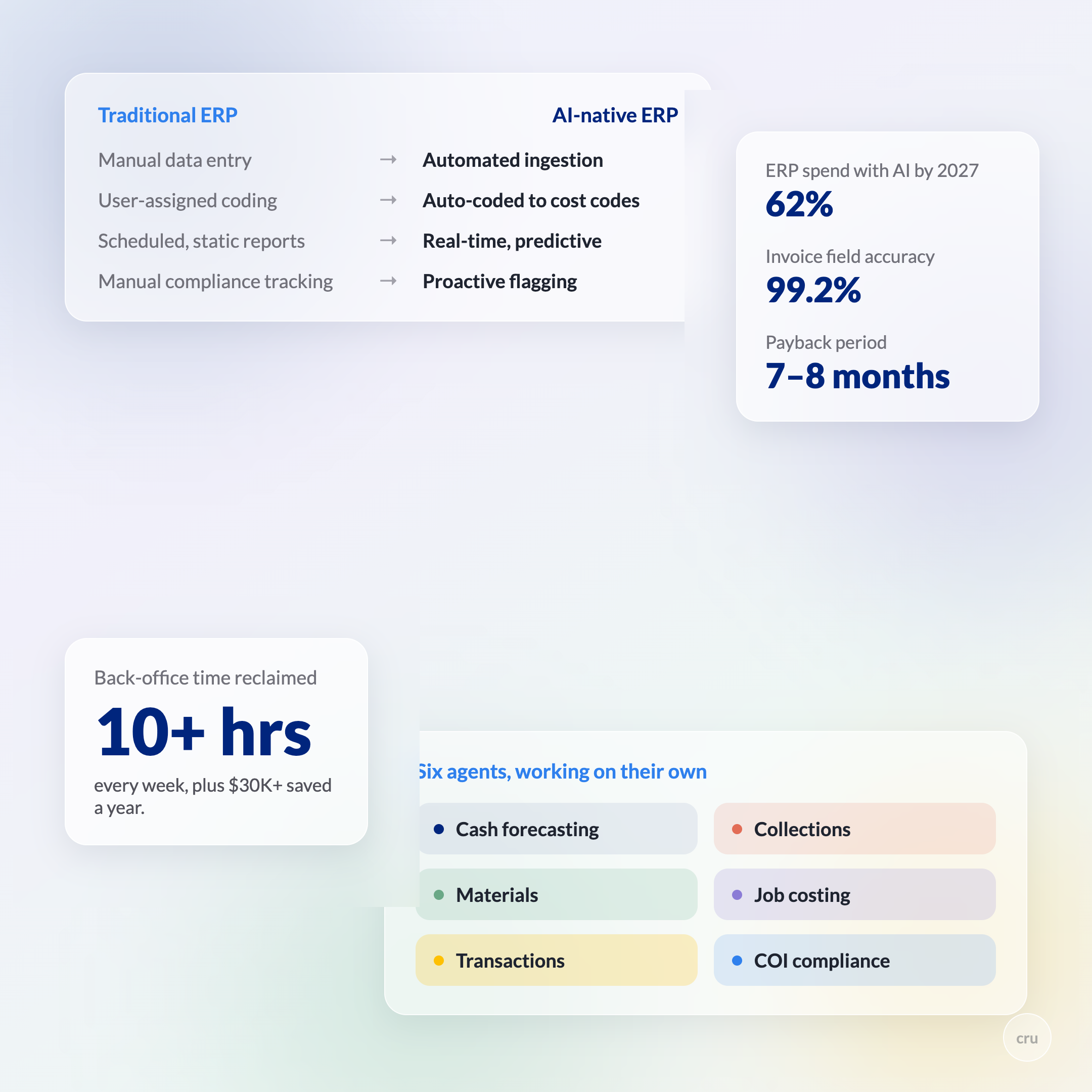
An AI-native system reasons through the data instead of just storing it. Gartner projects that by 2027, 62% of ERP spending will include AI capabilities, up from 14% in 2024. The shift isn't a feature, it's a change in what the software is for: from a tool you operate to a system that's doing the operating alongside you.
Concretely, that means data entry is automated instead of manual, transactions get coded to jobs and cost codes without you touching them, reporting is live instead of a monthly export, and compliance gets flagged proactively instead of discovered during an audit.
What makes it construction-specific
Generic accounting software was never built for how construction actually bills and gets paid, and that shows up in three places.
Job cost structure. Construction tracks cost at the job, phase, cost code, and cost type level, not just a general ledger line. Sage 100 Contractor gets this right structurally; AI-native platforms automate the allocation itself, learning your cost codes instead of making you assign them.
Retainage and progress billing. A system built for construction tracks retainage separately across the life of the project and can generate AIA G702/G703 forms without someone rebuilding them by hand every draw.
Lien waivers and COI compliance. Modern platforms extract data straight from lien waivers, pay apps, and certificates of insurance, and check the amounts against your commitments automatically, with field accuracy north of 99%. None of this works if the platform doesn't also connect to what you already use, Procore, GCPay, Textura, Sage, QuickBooks, Foundation, so data isn't re-typed at every handoff.
Six things it should actually do
Job costing that runs itself. Line items get coded to CSI MasterFormat codes at 95%+ accuracy, and the system gets sharper the more invoices it sees from a given vendor. Overruns get flagged against budget as transactions post, not at month-end.
Cash flow forecasting. Predictive models read AR aging, project timelines, and payment history to project your cash position 30 to 60 days out, early enough to actually do something about a shortfall instead of just watching it arrive.
Cru: Cash Flow Agent
See your cash position 30 to 60 days out, not just today
Cru's Cash Flow Agent reads AR aging, project timelines, and payment history to forecast your cash position early enough to act on a shortfall.
Book a demo →AP and AR on autopilot. Invoices get ingested straight from email and GC portals, matched three ways against POs and receipts, with exceptions routed for approval instead of every invoice needing a human touch. Outstanding receivables get followed up on automatically instead of falling off someone's list.
Compliance that flags itself. Missing endorsements, expired coverage, non-compliant limits, all surfaced before they become a jobsite problem, not after a GC catches it.
Materials intelligence. Quotes get matched against invoices, unit rates get enforced, and price trends get flagged early enough to renegotiate before they hit your margin.
Transaction categorization. Bank and card transactions get coded to jobs and cost codes automatically, learning your patterns instead of making someone categorize the same twenty vendors every month.
Who's actually building this for subs
Cru by Constrafor is built specifically for the subcontractor segment most of these platforms weren't designed for, six agents (cash forecasting, collections, materials, job costing, transactions, and COI) running off one connected data source, with plug-and-play integrations into Procore, Textura, GCPay, Sage, QuickBooks, and Foundation. Customers report 10+ hours back a week and $30K+ a year once it's running.
Adaptive takes a similar agentic approach, with agents for job costing, billing, WIP forecasting, change orders, and compliance that learn from your specific costs and approval patterns rather than applying generic rules.
CMiC NEXUS is the enterprise option, 25+ AI agents across a unified platform used by a quarter of ENR's Top 400 contractors. It's built for large, multi-entity operations, not a $10M sub looking to get off spreadsheets this quarter.
What it's actually worth
Time: users report reclaiming 10+ hours a week once agents handle coding, approvals, and payment follow-up. Report compilation drops by up to 70%, and invoice processing that used to take days can take minutes.
Cost: material rate enforcement alone saves 3%+ on spend, and firms report $30K to $50K a year in reduced tool fees and error correction combined. Specialty contractors using connected construction tech report handling 20% to 30% more project capacity without adding headcount.
Risk: earlier cash visibility, fewer missed compliance deadlines, and a measured 16% average reduction in rework among contractors using connected technology. Most mid-sized contractors hit positive ROI within seven to eight months.
How to actually evaluate one
Ask five questions before you sign anything:
Does it understand construction specifically, retainage, progress billing, AIA forms, not just generic "AI" bolted onto a normal ledger?
Does it plug into what you already use, or does it require you to rip out your existing stack?
What's the actual level of autonomy, does it suggest and wait for approval, or does it act?
What's the real implementation timeline, weeks or months, and who's doing the change management?
And can they show you real numbers from a customer that looks like you, not just marketing copy?
If a platform can't explain how it handles retainage, that's the answer. If it doesn't connect to Procore, Sage, or QuickBooks, that's the answer too.
Run your back office on agents that act, not just report
Free to connect, no commitment. See your first cash flow forecast in minutes.
Book a demoTL;DR
- Most "AI ERP" software is a dashboard with a chatbot attached. A real one acts on your data without you asking it to.
- Construction-specific means job costing by phase and cost code, retainage tracked separately, and lien waiver/COI data extracted automatically.
- Look for six things: autonomous job costing, cash forecasting, AP/AR automation, compliance flagging, materials intelligence, and transaction categorization.
- Most mid-sized contractors see positive ROI in 7 to 8 months.
- If a platform can't explain how it handles retainage, it wasn't built for you.
See how Cru's agents handle billing, job costing, and compliance without you touching them →